

In this article, we’ll show you step-by-step, how to perform a Database Dump in Sage 300.
Prerequisite: You must have access to an administrative user in Sage 300 which has the permission to perform a Database Dump.
Step 1:
Go to Administrative Services -> Database Dump
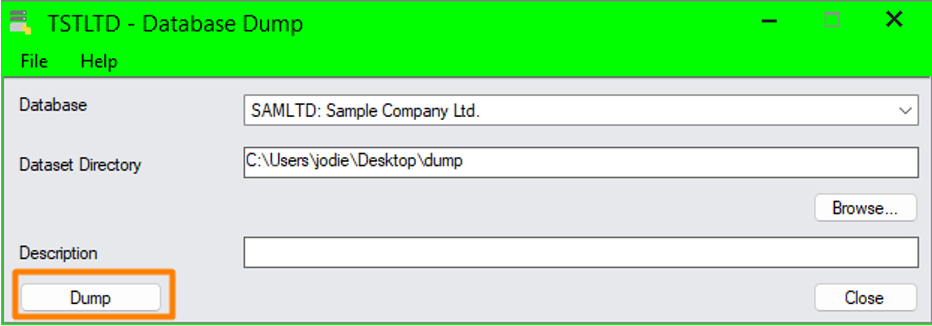
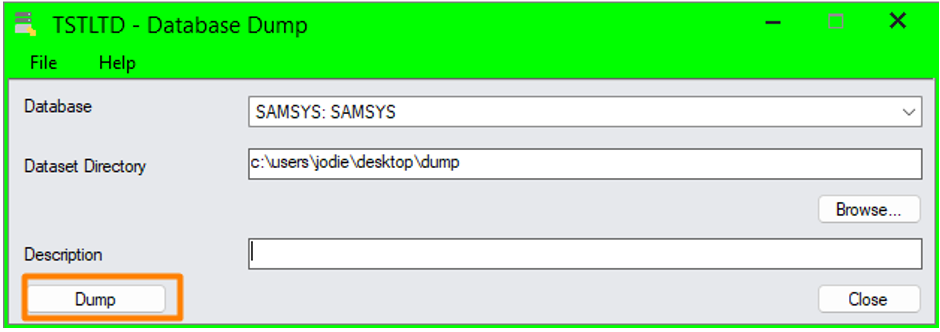
Choose the appropriate database. There are two types available – one for the company and the other for the system.
Set an output folder ‘Dataset Directory’ and click ‘Dump’ for each one.
Step 2:
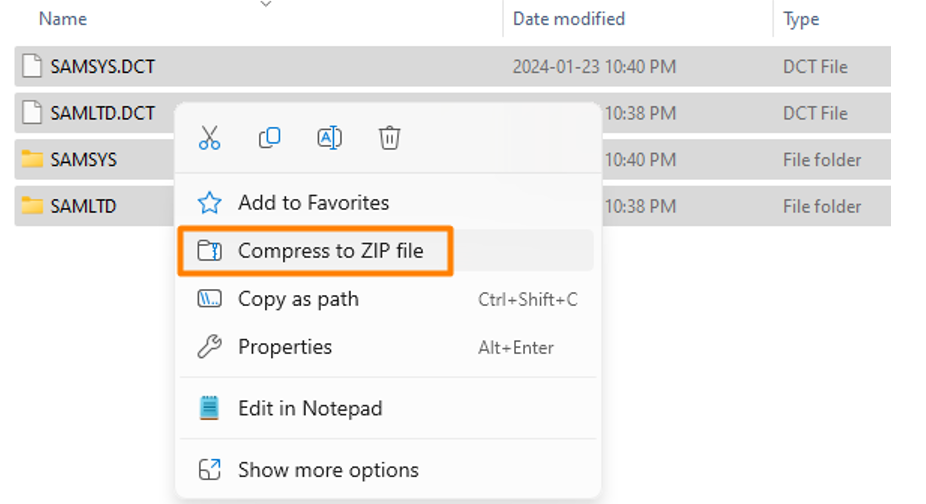
Navigate to your selected output folder, and you’ll file files and folders with the database names you have dumped. Compress these into a ZIP file.
Can you be more specific about the content of your article? After reading it, I still have some doubts. Hope you can help me.
Thank you for your sharing. I am worried that I lack creative ideas. It is your article that makes me full of hope. Thank you. But, I have a question, can you help me?
Can you be more specific about the content of your article? After reading it, I still have some doubts. Hope you can help me.
Thank you for your sharing. I am worried that I lack creative ideas. It is your article that makes me full of hope. Thank you. But, I have a question, can you help me?
I don’t think the title of your article matches the content lol. Just kidding, mainly because I had some doubts after reading the article.